Best Learning Apps for Students in 2026 — Real Apps, Real Results
I tested the 15 best learning apps for students for 30+ days each. Not from press releases or app store descriptions — from daily use. Here are the ones that survived my delete spree.
📱 15 Apps Tested 🕒 30+ Days Each 🇮🇳 India-Focused 💰 Free + Paid
best learning apps for students
The best learning apps for students in 2026 are not the ones that you see all the time on Instagram. These learning apps are not flashy. They are the ones that really work. The learning apps help students remember things and focus. When exams are a week away, these learning apps can really help students improve their grades. The learning apps are quiet. They do what they are supposed to do. They help students learn. That is what really matters to students.
I’ve been using apps for studying, writing, and content work for 8+ years now. Some of these apps I use every single day. Others I tested because my cousin’s college group swears by them. And a few? I downloaded expecting nothing and was shocked by how useful they turned out to be.
This list isn’t a “top 100 apps” dump; It’s 15 apps I can vouch for. Each one earned its spot. Let’s get into it.
🧑💻
IamPrasadTech
4+ years testing tech in real Indian conditions — Hyderabad heat, power cuts, slow WiFi, and exam stress. I use at least 4 of these apps daily.
Quick Comparison — 15 Best Learning Apps for Students in 2026
#
App
Best For
Price
My Rating
1
Khan Academy
Free Subject Learning
100% Free
⭐ 4.9
2
Notion
Study Planning & Notes
Free / Plus
⭐ 4.8
3
Quizlet
Flashcards & Revision
Free / Plus
⭐ 4.7
4
Duolingo
Language Learning
Free / Super
⭐ 4.7
5
Forest
Focus & No-Distraction
₹170 (one-time)
⭐ 4.6
6
Grammarly
Writing & Assignments
Free / Premium
⭐ 4.6
7
Coursera
University Courses
Free / Paid Certs
⭐ 4.5
8
Microsoft Lens
Scanning Notes & Docs
100% Free
⭐ 4.5
9
ChatGPT
Research & Doubt-Solving
Free / Plus
⭐ 4.5
10
Unacademy
JEE, NEET, UPSC
Free / Subscription
⭐ 4.4
11
Photomath
Math Step-by-Step
Free / Plus
⭐ 4.4
12
Spotify
Study Music & Podcasts
Free / Premium
⭐ 4.3
13
Google Classroom
Assignments & Grades
100% Free
⭐ 4.3
14
BYJU’S
Class 4–12 CBSE/ICSE
Free / Paid
⭐ 4.2
15
Canva
Presentations & Design
Free / Pro
⭐ 4.5
Detailed Reviews — Best Learning Apps for Students (My Honest Take)
#1
Khan Academy — The One That Makes Every Other App Feel Overhyped
Math, Science, Economics, Computing — All Free Forever.
🏆 EDITOR’S PICK
I’m going to start with Khan Academy because it changed the way I think about online education. This app is 100% free. No hidden subscriptions. No “free trial for 7 days” nonsense. This is a collection of lessons. The lessons are in math, physics, chemistry, biology, economics, and even computing. You can find many lessons in math, physics, chemistry, biology, economics, and computing.
I began using it when I struggled with statistics in college in Hyderabad. My tuition teacher would explain a concept once, and if I didn’t get it, tough luck. Khan Academy let me watch the same concept five times, at 1.5x speed, in my room at midnight. That’s when I realised this was one of the best learning apps for students who need to learn at their own pace.
The practice exercises adapt to your level. Get a question wrong? It shows you the solution and gives you a similar problem. Get three right in a row? It bumps up the difficulty. It’s simple, but it works.
🍵 Real story: My neighbour’s daughter was failing Class 10 math. Her parents couldn’t afford extra tuition. I set her up with Khan Academy on her dad’s old phone. She used it for 30 minutes a day. She passed with a 78. Not a miracle — just consistency and a good app.
📱 Android, iOS, Web 💰 100% Free 🌐 Works offline (downloaded lessons) ⭐ My Rating: 4.9/5
#2
Notion — My Brain Lives Here Now
Notes, To-Do, Study Planner, Assignment Tracker — All in One
Free
I can’t function without Notion. That’s not an exaggeration. My content calendar, personal notes, article drafts, and daily to-do lists are all in one place. I use it on my laptop, phone, and tablet. Everything syncs. Nothing gets lost.
This thing is really helpful for students. Students can create a study schedule. They should track assignment due dates, take class notes, format them, and list exam topics. The free version of this thing gives students pages and blocks to use for their own stuff.
A friend studying for CA uses Notion to organise subjects. She has a dashboard with progress bars. She can see exactly how much she’s covered at a glance. That kind of visual tracking keeps you motivated when the syllabus feels endless. Notion deserves its spot in any list of best learning apps for students.
💡 Pro tip: Search “Notion student template” on Google. You can find hundreds of free templates made by students. They help with study planning, habit tracking, and exam prep. Don’t build from scratch—start with a template and customise it.
📱 Android, iOS, Web, Desktop 💰 Free for personal use ⭐ My Rating: 4.8/5
#3
Quizlet — I Use This Daily; Not Joking.
Flashcards, Practice Tests, Spaced Repetition
⭐ I USE DAILY
The title of this article says “I use #3 daily” — this is that app. Quizlet uses flashcards and spaced repetition. This means it shows you what you’re about to forget, just in time. That’s backed by actual cognitive science research.
I make flashcard sets for everything. I use them for tech specs I need for reviews, vocabulary for my content, and even random facts I find. It takes 5 minutes to make a set. Then the app quizzes you automatically. It sticks. I’ve never found a faster way to memorise things.
For students, it’s a weapon during exam season. Create cards for definitions, formulas, dates, reactions — whatever you need. You can search through millions of sets made by other students in the same subjects. Quizlet is my top pick for students when I discuss the best learning apps for exam prep.
📱 Android, iOS, Web 💰 Free / Quizlet Plus 🧠 Spaced Repetition ⭐ My Rating: 4.7/5
#4
Duolingo — The Green Owl That Won’t Let You Quit
40+ Languages, Gamified Lessons, Streak System
Free
I started learning Japanese on Duolingo because I watch a lot of anime (yes, that’s the real reason). Six months later, I can read basic hiragana and hold a simple conversation. For a free app, that’s wild.
The streak system is what keeps you coming back. Skip a day, and that green owl sends a super passive-aggressive alert. It’s funny, but it works. My streak is at 180+ days right now, and I’m scared to break it.
Duolingo is a top choice for students learning foreign languages. It’s great for those prepping for exams like IELTS, TOEFL, or DELF. Plus, you can practice daily without spending any money.
📱 Android, iOS, Web 💰 Free / Duolingo Super 🌍 40+ Languages ⭐ My Rating: 4.7/5
#5
Forest — ₹170 to Save You from Instagram Reels During Study Time
Plant a Tree While You Focus. Touch Your Phone; the Tree Dies.
₹170 One-Time
You sit down to study. You pick up your phone “just to check.” 40 minutes later, you’re watching a random wedding dance reel from a city you’ve never been to. Sound familiar? Forest fixes this problem.
You set a timer. A virtual tree starts growing. If you leave the app open to Instagram, YouTube, or anything else, the tree dies. That’s it. That’s the whole concept. And it works because nobody wants to kill a tree.
I’ve planted over 500 trees in this app during writing sessions. The guilt of killing a digital tree is a surprisingly powerful motivation. At a one-time cost of ₹170, it’s the cheapest productivity tool I’ve ever bought. For students who waste time on social media, Forest is a top choice among learning apps. It doesn’t teach you directly, but it helps you focus on studying.
📱 Android, iOS 💰 ₹170 (one-time) 🌳 Plants real trees too! ⭐ My Rating: 4.6/5
#6
Grammarly — Fixes Your Assignment Before Your Professor Sees It
Grammar, Spelling, Tone, Plagiarism Check
Free / Premium
I use Grammarly for every article I write on this website. Every single one. The free version catches spelling errors, basic grammar issues, and punctuation mistakes. The premium version checks for tone, clarity, and even plagiarism.
For students writing assignments, research papers, or emails to professors — Grammarly is insurance. It catches mistakes you don’t even notice. I once had it flag “your” instead of “you’re” in an email to a client. That one save was worth the entire app.
Install the keyboard on your phone and the browser extension on your laptop. It works everywhere — Gmail, Google Docs, WhatsApp Web. If you write anything in English, Grammarly should be on your list of best learning apps for students if you write in English.
Want to take a course from IIT Bombay, Stanford, or Google — for free? Coursera makes that possible. You can audit most courses for free. You only pay if you want a certificate.
I completed Google’s Digital Marketing certificate on Coursera last year. It took me 3 weeks of 1-hour evening sessions. The certificate actually got me a freelance project because the client saw it on my LinkedIn. That’s a direct return on time invested.
College students often want skills their classes don’t cover. Skills like data science, Python, UX design, and machine learning are in demand. Coursera helps fill that gap. It’s one of the best learning apps for students who want to go beyond their syllabus and build a real résumé.
📱 Android, iOS, Web 💰 Free audit / Paid certificates ⭐ My Rating: 4.5/5
#8
Microsoft Lens — Scan Notes in 2 Seconds Flat
Scan Whiteboard, Handwritten Notes, Documents → PDF
100% Free
Your professor writes 10 slides of notes on the whiteboard. Class is over in 5 minutes. Everyone’s scrambling to take photos. Microsoft Lens turns that chaos into clean, readable PDF scans in seconds.
Point your camera at the whiteboard. It will auto-crop, fix the angle, remove shadows, and save a clear document. You can also scan handwritten notes, printed documents, and even business cards. I used it heavily during college and still use it to scan receipts and documents.
It’s free, it’s fast, and it saves you from squinting at blurry phone photos during revision week. Every student should have this installed. It’s one of the most underrated best learning apps for students.
It’s 11 PM. Your exam is tomorrow. You’re stuck on a concept. Your teacher won’t reply. Your classmates are asleep. ChatGPT is awake. Type your doubt and get an explanation within seconds.
I use ChatGPT every day. It helps me with research, brainstorming article ideas, and simplifying technical concepts. For students, it’s like having a tutor who never gets impatient. Ask it to explain photosynthesis like you’re 5 years old. Ask it to quiz you on Indian history. Ask it to check your essay structure.
⚠️ Warning: Don’t copy-paste ChatGPT answers into your assignments. Professors can detect it now. Use it to understand concepts, not to submit its writing as yours. Use it as a learning tool — that’s why it’s on the list of best learning apps for students.
📱 Android, iOS, Web 💰 Free / ChatGPT Plus ⭐ My Rating: 4.5/5
#10
Unacademy — For JEE, NEET, UPSC, and Every Indian Exam
Live Classes, Mock Tests, Top Educators
Free / Subscription
If you’re preparing for a competitive exam in India, you’ve already heard of Unacademy. But is it actually worth it? Here’s my honest take after watching my cousin use it for six months of NEET prep.
The free content is surprisingly good. It provides live classes from well-known educators. You can also find daily practice questions and test series for JEE, NEET, UPSC, GATE, and CAT. The paid subscription unlocks recorded lectures and detailed performance analytics. This is where the real value lies, as it shows you exactly which topics you need to improve.
My cousin’s weak point was organic chemistry. Unacademy’s analytics caught that pattern before he did. He focused on that section for two weeks. His mock test scores jumped from 520 to 580. Unacademy is a leading app for students preparing for Indian competitive exams.
📱 Android, iOS, Web 💰 Free / Subscription 🎯 JEE, NEET, UPSC, GATE, CAT ⭐ My Rating: 4.4/5
#11
Photomath — Point Your Camera at Math, Get Answers
Step-by-Step Solutions, Algebra to Calculus
Free / Plus
I’m going to be honest — when I first tried Photomath, I thought it was just a fancy calculator. Point your camera at a math problem, get the answer. Cool, but not useful for learning, right? Wrong.
The magic is in the step-by-step breakdowns. It doesn’t just give you “x = 7”; it shows you every single step, every rearrangement, and every formula used. You can tap on any step, and it explains why that step happened. That’s how you actually learn math: not from the answer, but from the process.
It handles algebra, trigonometry, calculus, statistics, and more. For students stuck on homework at 10 PM with no tutor available, this is a lifesaver. It belongs on the list of best learning apps for students who find math intimidating.
📱 Android, iOS 💰 Free / Photomath Plus 📸 Camera → Step-by-Step ⭐ My Rating: 4.4/5
#12
Spotify — Yes, a Music App. Hear Me Out.
Study Playlists, Focus Music, Podcasts
Free / Premium
Is a music app in the list of the best learning apps for students? Before you scroll past — search “lofi study beats” on Spotify. Play it during your next study session. Tell me you didn’t focus better.
Research backs this up. Background music without lyrics helps many people concentrate. I play “Deep Focus” playlists during writing sessions, and my output doubles. Spotify also has academic podcasts, science explainers, and language practice channels.
I really like using Forest to help me focus and Spotify to play music in the background. This combination has been really helpful to me during late-night study sessions. I have written a guide to the best learning apps available in India. You can check it out for more options on learning apps.
📱 Android, iOS, Web 💰 Free with ads / Premium 🎵 Study Playlists + Podcasts ⭐ My Rating: 4.3/5
#13
Google Classroom — Where Your School Already Lives
Assignments, Grades, Class Materials
100% Free
Many schools and colleges in India now use Google Workspace. Then Google Classroom is probably something you use. Teachers post assignments there. They also share materials and send announcements on Google Classroom.
What makes it useful isn’t the features; it’s the integration. Submit assignments from anywhere. Get notifications when a teacher posts something new. Access everything through Google Drive and Docs. It’s not exciting, but it works reliably every day. That’s why it’s on the list of best learning apps for students — because you probably already need it.
📱 Android, iOS, Web 💰 Free 📋 Assignments + Grades ⭐ My Rating: 4.3/5
#14
BYJU’S — Works for School Students, Not for Everyone
CBSE, ICSE, JEE & NEET Foundation — Class 4–12
Free / Paid
BYJU’S gets a lot of mixed opinions online. Here’s my take: it is effective for school students in classes 4 to 12. They benefit from visual, animated explanations of their CBSE or ICSE syllabus.
The animated video lessons simplify complex science and math concepts. They make it easier to understand than textbooks do. The adaptive learning system adjusts the difficulty based on how you perform. The JEE/NEET foundation test series is solid for students starting early.
My concern? The paid plans can be expensive. And some students have reported aggressive sales calls. But the learning content itself — especially for younger students — is really good. If your budget allows it, it’s one of the best learning apps for students in Indian schools.
📱 Android, iOS 💰 Free trial / Paid 🏫 CBSE, ICSE, State Boards ⭐ My Rating: 4.2/5
#15
Canva — Your Presentation Will Look Better Than Your Professor’s
Slides, Posters, Infographics, Resumes
Free / Pro (Free for Students)
Last semester, a student I know submitted a project presentation designed in Canva. The professor asked if she had hired a designer. She didn’t. She used Canva for 30 minutes.
Canva offers more than 1,000 templates. You can use these for presentations, posters, resumes, infographics, and social media posts. Drag and drop. No design skills are needed. You can collaborate with classmates in real time and export your work as a PDF, PNG, or PPT.
The best part? Canva Pro is free for students through their education program. That unlocks premium templates, background remover, and brand kit features. For project work and presentations, it’s one of the best learning apps for students.
📱 Android, iOS, Web 💰 Free / Pro (free for students) 🎨 Presentations + Posters + Resumes ⭐ My Rating: 4.5/5
Best App Combinations for Students — My Personal Recommendations
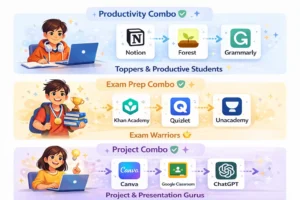
Don’t just download one app and expect miracles. The best learning apps for students work even better when combined. Here’s what I recommend based on your situation:
🏆 For Academic Toppers
Notion (study planning) + Forest (focus sessions) + Grammarly (assignment writing). This combo keeps you organised, focused, and polished. I use this exact setup for my content workflow.
🎯 For Competitive Exam Warriors
Khan Academy (concept building) + Quizlet (rapid revision) + Unacademy (mock tests + analytics). My cousin used this combination for NEET and improved his score by 60 marks in two months.
🎨 For Project and Presentation Stars
Canva (design slides) + Google Classroom (submit work) + ChatGPT (research and brainstorm). You’ll produce work that looks professional and is well-researched.
Frequently Asked Questions: Best Learning Apps for Students
Q1. Which is the single best learning app for students in 2026?
There’s no single answer because it depends on what you need. For subject learning, I’d pick Khan Academy. For organisation, Notion. For exam prep in India, Unacademy. For daily revision, Quizlet. Pick based on your goal.
Q2. Are these learning apps free to use?
Most of the apps I use are totally free. I mean, Khan Academy, Notion, Quizlet, Duolingo, Grammarly, Google Classroom, Microsoft Lens, and ChatGPT are all really good, even if you do not pay for them. Forest is a bit different; it costs ₹170. You only have to pay one time. Then there are Coursera, BYJU’S, and Unacademy. These apps have some features that you have to pay for.
Q3. How many learning apps should a student download?
I’d say 3 to 4 at most: one for learning subjects, one for organising, one for focusing, and maybe one for a specific need, like language or writing. Too many apps distract rather than help.
Q4. Can learning apps replace school or tuition classes?
They can replace tuition for many students — I’ve seen it happen. But they work best as a supplement to school, not a replacement. Use apps to practice, revise, and fill gaps. Still attend your classes and take notes.
Q5. Which learning apps are best for Indian students specifically?
BYJU’S and Unacademy are designed specifically for Indian syllabi and competitive exams. Khan Academy also covers topics from the Indian curriculum. The rest of this list is universal and works well for Indian students.
🎯 My Final Verdict
I’ve tested a lot of apps over the years. Most of them get deleted within a week. These 15 survived because they actually made a difference — in my workflow, in my cousin’s exam scores, in my neighbor’s daughter’s confidence with math.
I have tested a lot of apps over the years. Most of these apps get deleted within a week. These fifteen apps stood out. They improved my workflow, boosted my cousin’s exam scores, and helped my neighbour’s daughter gain confidence in math.
My honest advice? Don’t download all 15. Pick 2 or 3 that match your current situation. Use them every day for one month. Then tell me your results.
Drop your class, stream, or exam goal in the comments below. I’ll personally suggest the best 2-3 apps for your exact situation. I reply to every single one.