
20+ Tools Tested | 3+ Months of Testing | 10 Tools That Made the Cut |
Why I Started Looking for AI Agents for Productivity
AI agents for productivity are the only reason I didn’t completely lose my mind this year. Seriously. I was running three freelance projects at once, replying to 70+ emails a day, attending back-to-back client calls, and manually doing research that ate up entire mornings. If that sounds familiar, keep reading.
I’m Prasad. I tested these AI agents for productivity while juggling actual deadlines, difficult clients, and (yes) multiple chai breaks in between.
In the last 3 months, I went through 20+ tools so you don’t have to waste your time and money doing the same. Most of them are pure noise. But these 10 AI agents for productivity that I’m listing today? They passed every real-world test I threw at them. Some of them I genuinely can’t work without anymore.
This isn’t a copy-paste listicle. Every tool here, I actually used for weeks — not just signed up and took a screenshot.
📌 Disclosure: None of these tools sponsored this article. I paid for most subscriptions out of my own pocket. I only recommend what I actually use and find worth the money.
What Are AI Agents for Productivity — and Why Now?
There’s a big difference between a basic AI chatbot and a real AI agent for productivity. A chatbot waits for your questions and answers them. An AI agent for productivity actually takes action — it can browse the web, organize your calendar, write emails, run deep research, connect your apps together, and execute multi-step workflows, all without you watching every single step.
That’s the shift that’s happening right now. You’re not just getting suggestions anymore — you’re getting an AI that works on your behalf. Think of it as a junior assistant who never sleeps, never complains, and doesn’t eat your office snacks.
And the numbers back this up. McKinsey estimates the productivity impact of AI at $4.4 trillion. Gartner says 15% of daily work decisions will be made autonomously by AI by end of 2026. We’re not talking future predictions. This is happening right now, this year.
The people pulling ahead right now aren’t the ones with bigger teams or bigger budgets. They’re the ones using the right AI agents for productivity at the right time. So let’s get into it.
Ranked by Real-World Impact
🏆 Top 10 AI Agents for Productivity in 2026


#3 — Research Perplexity AIBest AI Agent for Productivity in Real-Time Research | Free / $20 mo |

You know what I hate? Googling something, getting 12 SEO-optimized articles, reading all of them, and still not finding the actual answer I needed. That was my entire research life before Perplexity.
This AI agent for productivity searches the internet in real-time and gives you a direct, cited answer — with sources you can actually verify and click through to. I use it for competitor research, fact-checking, quick market analysis, and anything where I need current data, not 2023 training data.
I ran a quick test: same research question to ChatGPT and Perplexity. ChatGPT gave me confident-sounding info that turned out to be outdated. Perplexity gave me fresh data from last week, with live links. For research specifically, this is the AI agent for productivity I’d hand to someone first.
#4 — Notion AI (Knowledge & Notes) | +$10/user/mo |

If your work involves managing notes, documents, project plans, or anything knowledge-related, Notion AI is one of the most practical AI agents for productivity I’ve come across. It sits right inside your workspace and can summarize entire pages, write first drafts from bullet points, pull action items from messy meeting notes, and even translate your documents.
I run my entire content calendar in Notion, and having the AI agent for productivity built in means I don’t have to switch tabs to generate outlines or first drafts. It’s not the most powerful AI on this list, but it’s contextually aware of your own content — which is something standalone AI tools simply can’t match.
Biggest honest complaint: Notion AI works best if you already live inside the Notion ecosystem. If you’ve never used Notion, you probably won’t switch just for the AI feature. But if you already use Notion daily? Turn this on immediately — don’t wait.
#5 — Automation 🔥 Zapier AI AgentsBest AI Agent for Productivity in Workflow Automation | From $49/mo |
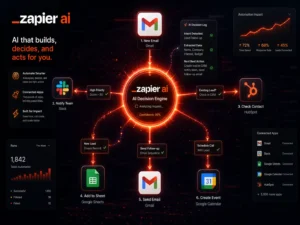
Most people know Zapier as a simple “if this then that” automation tool. Zapier’s AI Agents feature is a completely different level. You build an AI agent for productivity that makes actual decisions based on context — not just trigger-action rules. It connects to 7,000+ apps and runs multi-step workflows that would normally need a developer.
I set up an automation that reads new emails from clients, categorizes them by urgency, drafts a contextual response using AI, and logs everything to a Google Sheet for my daily review. That one AI agent for productivity workflow alone saves me 40–45 minutes every single day.
If you’re running any kind of business and still copying data between apps manually, you’re doing it wrong. Zapier’s AI agents will change how you think about automation entirely. Free plan available; AI Agent features start at $49/mo.

#7 — Scheduling Reclaim.aiBest AI Agent for Productivity in Time Management | Free / $10 mo |

Most people haven’t heard of this one. That’s their loss. Reclaim.ai is an AI agent for productivity that actively manages your calendar. You set your priorities — “I need 2 hours of deep work every morning” or “block time for gym 4 days a week” — and it auto-schedules those blocks in your Google Calendar, intelligently rescheduling around incoming meetings.
I’ve been using it for 4 months now. My biggest personal win: I used to lose all my writing time to random calendar invites that people dropped in without asking. Now Reclaim defends my morning focus block and automatically pushes conflicting meetings to better slots. This AI agent for productivity literally changed how my days feel.
Works best with Google Calendar (Outlook integration is improving). If you’re someone whose real work keeps getting eaten by meetings, Reclaim.ai will pay for itself in the first week. Free plan available.
#8 — For Developers 💻 Cursor IDEBest AI Agent for Productivity in Coding | $20/mo Pro |

If you write code — even occasionally — Cursor is the AI agent for productivity you should try before anything else on this entire list. It’s not a plugin you bolt onto VS Code. It’s a completely rebuilt IDE with AI built into the architecture from the ground up.
A friend at a Hyderabad product startup told me their team cut feature development time by nearly half after switching to Cursor. Cursor hit $2 billion in annual recurring revenue in 2026 — developers are voting with their wallets. You describe what you want in plain English, and it plans, writes, and connects code across multiple files automatically.
Not for non-technical people — this one requires coding familiarity. But if you’re a developer searching for an AI agent for productivity that truly understands your full codebase context? Nothing on the market comes close right now.
| ✍️ #9 — Grammarly AI Best AI Agent for Productivity in Daily Communication | Free / $30 mo |

Grammarly has gone way beyond spell-checking. It’s now a proper AI agent for productivity in your communications layer — rewriting full emails, adjusting tone based on context (formal, friendly, direct), and generating Slack or email replies in your own writing style.
The browser extension works across Gmail, Notion, Slack, LinkedIn, and basically everywhere you type. It’s the most invisible AI agent for productivity on this list — you stop noticing it’s there because it just quietly improves everything you write.
I use it for client emails where I need to sound professional without sounding stiff. The tone-detection feature alone is worth it. Grammarly’s free version is surprisingly powerful — the paid plan adds full-sentence rewrites and style matching.
#10 — Power Users n8nBest Open-Source AI Agent for Productivity Automation | Free (Self-Host) |

n8n is what you reach for when Zapier starts feeling too limited or too expensive. It’s open-source, self-hostable on your own server, and honestly one of the most powerful AI agents for productivity available right now — if you’re ready to spend a few hours learning it.
I use n8n to build AI workflows that pull data from multiple APIs, run it through an LLM, and output clean results to Slack or email — all running on my own server, zero per-run fees. For a bootstrapped Indian startup or a solo consultant keeping an eye on costs, this is genuinely gold.
The learning curve is real. But the n8n community is fantastic and there are hundreds of free workflow templates to start from. If you want to build truly custom AI agents for productivity without paying per-run platform fees, n8n is the answer.
Quick Comparison — All 10 AI Agents for Productivity
| Tool | Best For | Starting Price | Free Plan |
|---|---|---|---|
| ChatGPT | General AI tasks | $20/mo | ✅ |
| Claude | Writing & Analysis | $20/mo | ✅ |
| Perplexity | Real-time Research | $20/mo | ✅ |
| Notion AI | Notes & Knowledge | +$10/mo add-on | ❌ |
| Zapier AI | App Automation | $49/mo | ✅ |
| Otter.ai | Meeting Notes | $16.99/mo | ✅ |
| Reclaim.ai | Calendar & Scheduling | $10/mo | ✅ |
| Cursor | Coding | $20/mo | ✅ |
| Grammarly AI | Writing & Comms | $30/mo | ✅ |
| n8n | Custom Automation | Free (self-host) | ✅ |
How to Choose the Right AI Agents for Productivity
Not every AI agent for productivity will suit every person. Here’s how I’d approach picking the right one for your situation:
📝 You write and communicate a lot? Start with Claude for long-form content and Grammarly AI for everything else. Between the two, your output quality doubles with half the editing time.
📅 Drowning in back-to-back meetings? Otter.ai + Reclaim.ai is the exact combo you need. Otter handles transcription and summaries, Reclaim protects your actual focused work time. Both are excellent AI agents for productivity for this problem.
⚡ Want to automate repetitive tasks? Zapier AI Agents for fast setup with no code, n8n if you want full control and zero recurring cost. Pick based on your technical comfort level.
💻 You’re a developer? Cursor. Don’t overthink it. It’s the most complete AI agent for productivity built specifically for writing and shipping code faster.
📚 You Might Also Like
🎯 Bottom Line
My Final Verdict on AI Agents for Productivity
I’ve been testing AI agents for productivity seriously for months now, and the honest truth is — you don’t need all ten at once. Start with one or two that fix your single biggest productivity bottleneck right now. Add more tools as your workflow matures.
My personal daily stack is ChatGPT + Claude + Reclaim.ai + Otter.ai. That combination alone saves me at least 2 real hours every working day. And I know people who’ve layered Perplexity and Zapier on top of that and report saving even more.
The best AI agents for productivity are the ones that fit into how you already work — not the ones that force you to rebuild your entire workflow from scratch. Pick based on your real bottleneck, not based on what’s trending on Twitter right now.
💬 What’s Your Biggest Productivity Problem Right Now?
Drop your role, your workflow challenge, and your budget in the comments below — and I’ll personally recommend the best AI agent for productivity that fits exactly your situation. I reply to every single one.